SFM Compile for Custom Model Creation is an important process in Source Filmmaker (SFM) that allows creators to import and prepare custom 3D models for use in animations, posters, or game modifications. The compile process converts raw model files into a format that SFM can recognize, making it possible to add unique characters, props, or accessories to projects. This helps creators build more personalized and visually detailed content.
Source Filmmaker transforms game assets into cinematic animations. Converting custom 3D models for SFM requires technical precision through compilation processes that convert standard formats into Source Engine specifications.
To create a custom SFM model, users usually work with tools like Crowbar, Blender, and model compile scripts. The process includes rigging, texturing, exporting, and compiling the model into SFM-compatible files. A properly compiled model ensures smooth animations, correct textures, and fewer errors inside the SFM workspace.
What Is SFM Compile
SFM Compile converts 3D model files from formats like OBJ or FBX into MDL files readable by Source Filmmaker. The Source Engine accepts only this specific format for asset loading.
The compilation process combines mesh geometry, texture references, bone structures, physics properties, and animation sequences into a single package. Without proper compilation, models display as missing textures or fail to load entirely.
This technical requirement stems from Source Engine architecture. Standard 3D formats lack the engine-specific metadata required for proper rendering and animation support.
Essential Software for SFM Compile
Essential software for SFM compile includes several tools that help creators build and import custom models into Source Filmmaker (SFM). Programs like Blender are commonly used for 3D modeling and rigging, while Crowbar helps compile and decompile model files into formats compatible with SFM. Texture editing tools such as Photoshop or GIMP are also useful for improving model appearance and details.
Studiomdl Command Line Utility
Valve developed studiomdl.exe as the core compilation tool. The program resides in your SFM installation under the bin directory. Users execute bash commands through terminal interfaces to run the compiler with specific parameters.
Running the compiler through command line requires understanding basic terminal operations. The process reads QC script files and outputs compiled MDL assets.
Crowbar Compilation Tool
This graphical application simplifies batch processing for multiple models. Crowbar eliminates manual command entry while providing visual feedback during compilation operations.
3D Creation Software
Blender dominates the SFM workflow due to zero licensing costs and extensive plugin ecosystem. Commercial alternatives include 3ds Max and Maya, each priced above $1,700 annually.
Text Editor Requirements
Notepad++ serves most creators through syntax highlighting and line numbering features. These tools aid in debugging QC scripts where shell script errors frequently occur.
SFM Compile Process Steps
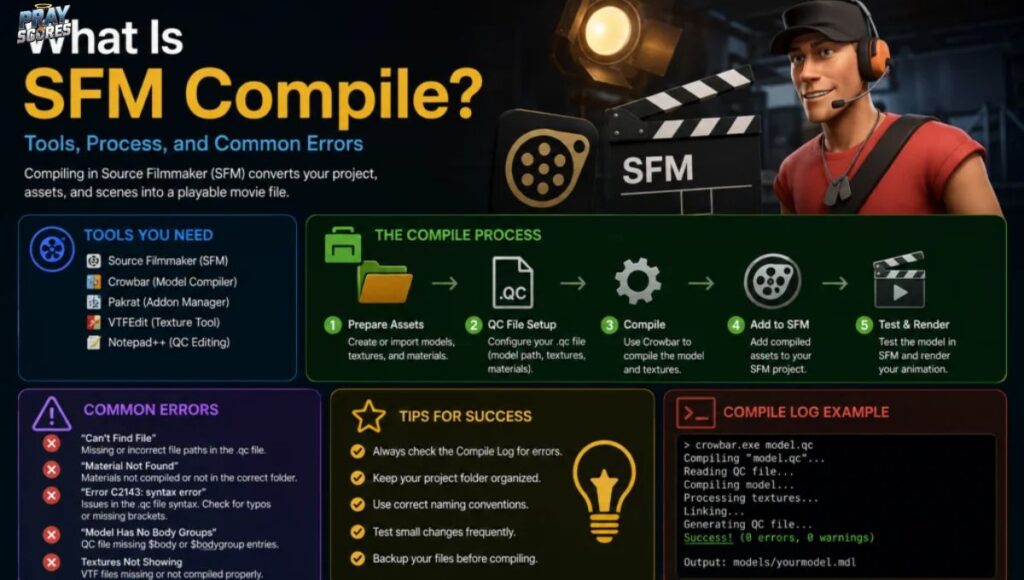
The SFM compile process involves several important steps to prepare a custom model for Source Filmmaker (SFM). First, creators design or edit the model in software like Blender, where rigging, textures, and animations are adjusted. After that, the model is exported into a compatible format and prepared with the required compile scripts and settings.
Asset Preparation
Models require polygon counts below 60,000 triangles for optimal performance. Bone hierarchies must follow Source Engine conventions. Export reference meshes and physics collision models as separate SMD files.
Texture paths demand verification before compilation. Missing materials cause the characteristic purple-black checkerboard pattern in Source Filmmaker.
Creating QC Files
The QC script defines asset properties through specific commands. The $modelname directive sets output location. $body references the mesh file. $cdmaterials points to texture directories.
Animation sequences require $sequence commands with frame ranges. Physics collision uses $collisionmodel with simplified geometry references.
| QC Command | Function |
| $modelname | Defines output path and filename |
| $body | References main mesh SMD file |
| $cdmaterials | Specifies texture folder location |
| $sequence | Defines animation parameters |
| $collisionmodel | Sets physics mesh properties |
Clear commenting practices prevent confusion during later modifications. File path accuracy prevents most compilation failures.
Running Compiler Operations
Terminal method users navigate to the bin folder containing studiomdl.exe. The command structure requires the QC file path as an argument. Output messages display in the terminal window showing progress or errors.
Crowbar users select the compile tab and browse for QC files. The graphical interface displays log information as compilation proceeds. Most beginners prefer this approach over terminal commands.
Realevent Post…………..url-encoder-spellmistake
Result Verification
Testing compiled assets occurs immediately in Source Filmmaker. Launch the program and locate models through the asset browser. Drag compiled models into scenes to check functionality.
Common issues include texture path errors, bone weight problems, and physics collision failures. Each requires specific troubleshooting approaches documented in Source Filmmaker communities.
Professional Best Practices for SFM Compile
Maintain organized directory structures separating models, materials, and scripts. Documentation of successful configurations saves time during future projects.
Start with simple models before attempting complex characters. Test after each significant modification to isolate problem sources. Study existing assets by decompiling professional models.
Understanding file comparison helps when debugging QC scripts. Version control systems track changes across project iterations.
Common SFM Compile Errors
Missing texture paths generate checkerboard patterns on model surfaces. Scale errors cause invisible assets in viewport. Rigging failures prevent proper posing of character bones.
Corrupt compilations crash Source Filmmaker during asset loading. Each error type requires specific diagnostic approaches based on compiler output messages.
Learning basic terminal operations assists in troubleshooting compilation problems. Log files contain detailed error information pointing to specific QC script lines.
Advanced SFM Compile Techniques
Experienced creators implement LOD systems for performance optimization. Facial flexes enable detailed expression animation. Custom shader parameters enhance material appearance.
Batch compilation scripts process multiple models sequentially. Python integration automates repetitive workflow tasks. These advanced methods require programming knowledge beyond basic compilation.
Frequently Asked Questions
What file formats does SFM Compile accept?
SFM Compile processes SMD and DMX mesh files along with QC scripts. The compiler outputs MDL, VVD, VTX, and PHY files required by Source Engine.
How long does SFM Compile take?
Simple models compile in seconds. Complex characters with multiple LODs and animations may require several minutes depending on system specifications.
Can SFM Compile work with Source 2?
Source 2 uses different asset formats. SFM Compile targets the original Source Engine. Source 2 projects require alternative compilation tools.
Why do compiled models show purple textures?
Purple checkerboard patterns indicate missing texture files. Verify material paths in QC scripts match actual texture locations in your materials directory.
Does SFM Compile require programming knowledge?
Basic QC scripting uses simple text commands. No programming experience needed for standard models. Advanced features may benefit from scripting knowledge.
Conclusion
SFM Compile for Custom Model Creation is an essential process for anyone looking to create unique content in Source Filmmaker (SFM). By compiling custom models correctly, creators can add personalized characters, props, and animations that improve the overall quality of their projects. The process may seem technical at first, but using the right tools such as Blender, Crowbar, and Source SDK can make model creation much easier and more efficient.
Understanding the proper compile steps, including rigging, texturing, exporting, and testing, helps reduce errors and ensures smooth performance inside SFM. Whether you are a beginner or an experienced creator, learning how to compile custom models opens more creative opportunities and gives you greater control over your animation projects. With practice and the right setup, custom model creation in SFM becomes a valuable skill for producing professional and visually impressive content.